Difference between revisions of "Cane Assumptions"
Jump to navigation
Jump to search
(Created page with "This page is for entering cane growing area, yield and CCS for each crop class. Other Crops information for area should also be entered in, if applicable. # Enter an area in...") |
|||
| (34 intermediate revisions by the same user not shown) | |||
| Line 1: | Line 1: | ||
This page is for entering cane growing area, yield and CCS for each crop class. Other Crops information for area should also be entered in, if applicable. | This page is for entering cane growing area, yield and CCS for each crop class. Other Crops information for area should also be entered in, if applicable. | ||
===Entering a Crop Class=== | |||
Start by clicking the "Add Cane Assumption" button, then select a crop class from the drop down box. | |||
[[File:Adding Cane Assumption.png|1000px|frame|center|link=]] | |||
====Entering Area==== | |||
'''Enter an area in hectares for each crop class grown on the farm.''' | |||
* A simple way to do this is to divide total cane growing area by the average number of ratoons, plant crop and fallow. | |||
* For example, if the total cane growing area is 150ha and four ratoons are grown on average, then 150ha divided by 6 equals 25 ha per crop class and fallow area (e.g. 6 is calculated by summing 4 ratoon crops + plant crop + fallow). | |||
====Entering Yield and CCS==== | |||
'''1. Enter long term average yield and CCS values.''' | |||
'''2. Click submit and follow the same process for other crop classes.''' | |||
* '''Important note:''' Deleting a crop entry will delete all of the growing costs associated with it on the [[Cane Growing Costs]] or [[Other Crops Growing Costs]] pages. | |||
[[File:Cane Assumptions 2.png|1400px|frameless|center|link=]] | |||
===Other Crops=== | |||
''' To enter a non-cane crop, enter the total area dedicated to these crops via "Add Cane Assumption" -> "Select Cane Type" -> "Other Crops Year 1 (and Other Crops Year 2, if required)".''' | |||
* This will create a total area for other (non-cane) crops. | |||
* The specific details of these crops (yield, price, etc.) can then be filled out via the [[Other Crop Assumptions]] page. | |||
[[File:Other Crops Cane Assumption.png|1000px|frame|center|link=]] | |||
[[Scenario Assumptions]] ⇐|⇒ [[Cane Growing Costs]] | |||
Latest revision as of 03:32, 28 June 2023
This page is for entering cane growing area, yield and CCS for each crop class. Other Crops information for area should also be entered in, if applicable.
Entering a Crop Class
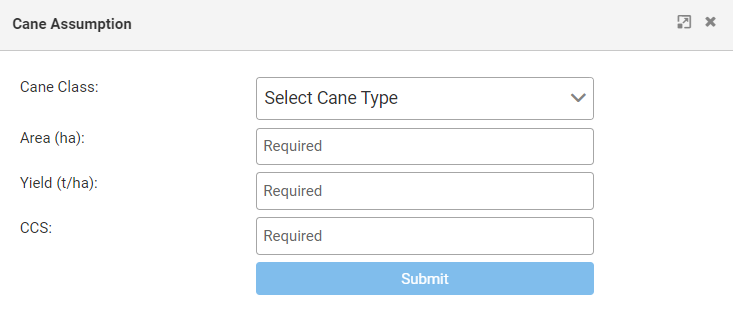
Start by clicking the "Add Cane Assumption" button, then select a crop class from the drop down box.
Entering Area
Enter an area in hectares for each crop class grown on the farm.
- A simple way to do this is to divide total cane growing area by the average number of ratoons, plant crop and fallow.
- For example, if the total cane growing area is 150ha and four ratoons are grown on average, then 150ha divided by 6 equals 25 ha per crop class and fallow area (e.g. 6 is calculated by summing 4 ratoon crops + plant crop + fallow).
Entering Yield and CCS
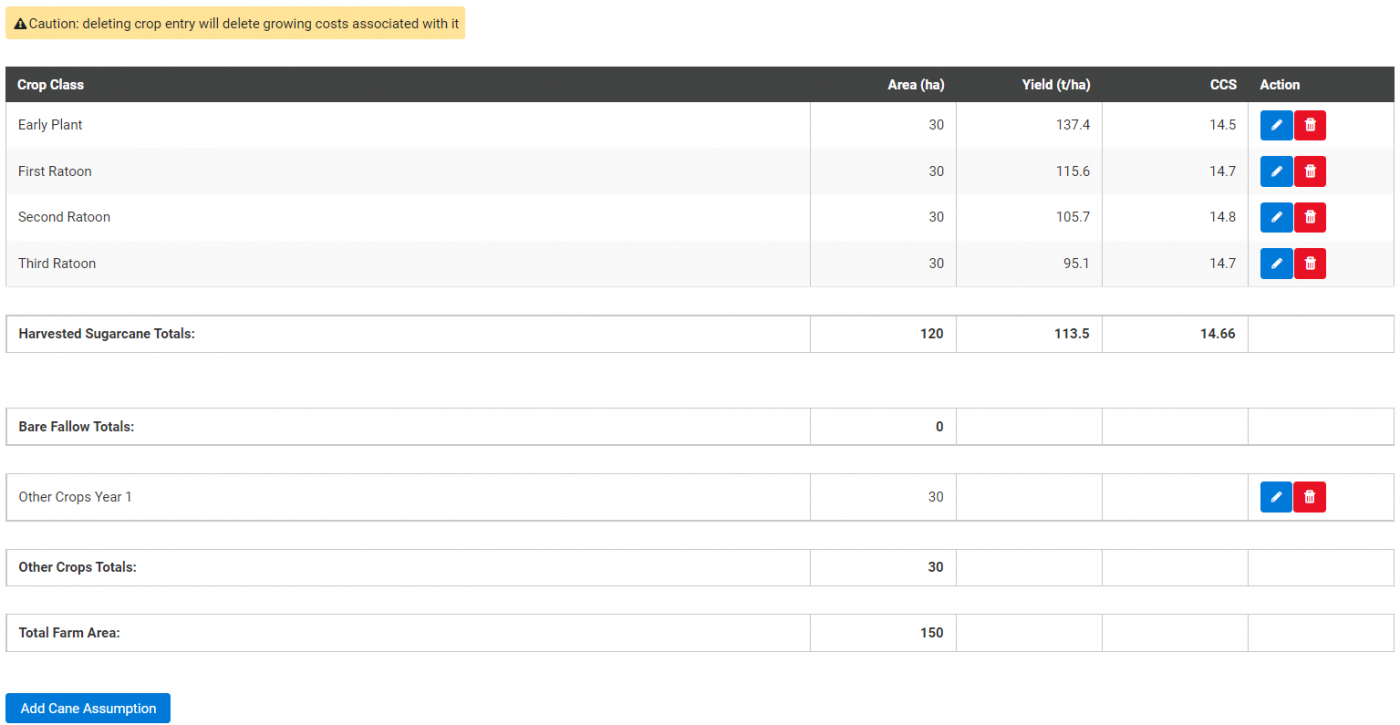
1. Enter long term average yield and CCS values.
2. Click submit and follow the same process for other crop classes.
- Important note: Deleting a crop entry will delete all of the growing costs associated with it on the Cane Growing Costs or Other Crops Growing Costs pages.
Other Crops
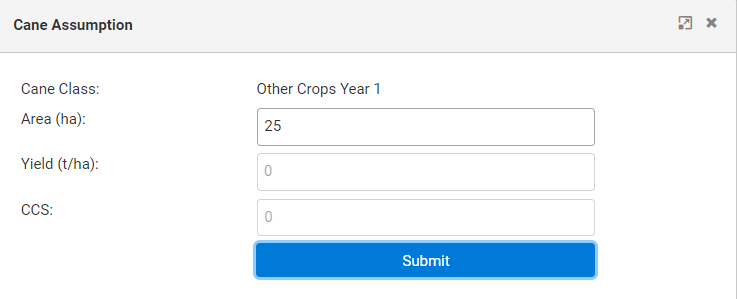
To enter a non-cane crop, enter the total area dedicated to these crops via "Add Cane Assumption" -> "Select Cane Type" -> "Other Crops Year 1 (and Other Crops Year 2, if required)".
- This will create a total area for other (non-cane) crops.
- The specific details of these crops (yield, price, etc.) can then be filled out via the Other Crop Assumptions page.