Difference between revisions of "Scenario Home"
Jump to navigation
Jump to search
| Line 5: | Line 5: | ||
*It is recommended that first time users follow the next buttons by pressing the arrows on the bottom of the page (the ‘user wizard’). | *It is recommended that first time users follow the next buttons by pressing the arrows on the bottom of the page (the ‘user wizard’). | ||
* Alternatively you can navigate through the different pages using the links on the left hand side bar. | * Alternatively you can navigate through the different pages using the links on the left hand side bar. | ||
<blockquote> '''Enter all prices exclusive of GST''' </blockquote> | |||
[[File:Scenario Home Flow Diagram.png|1000px|frameless|center]] | [[File:Scenario Home Flow Diagram.png|1000px|frameless|center]] | ||
Revision as of 21:51, 1 February 2022
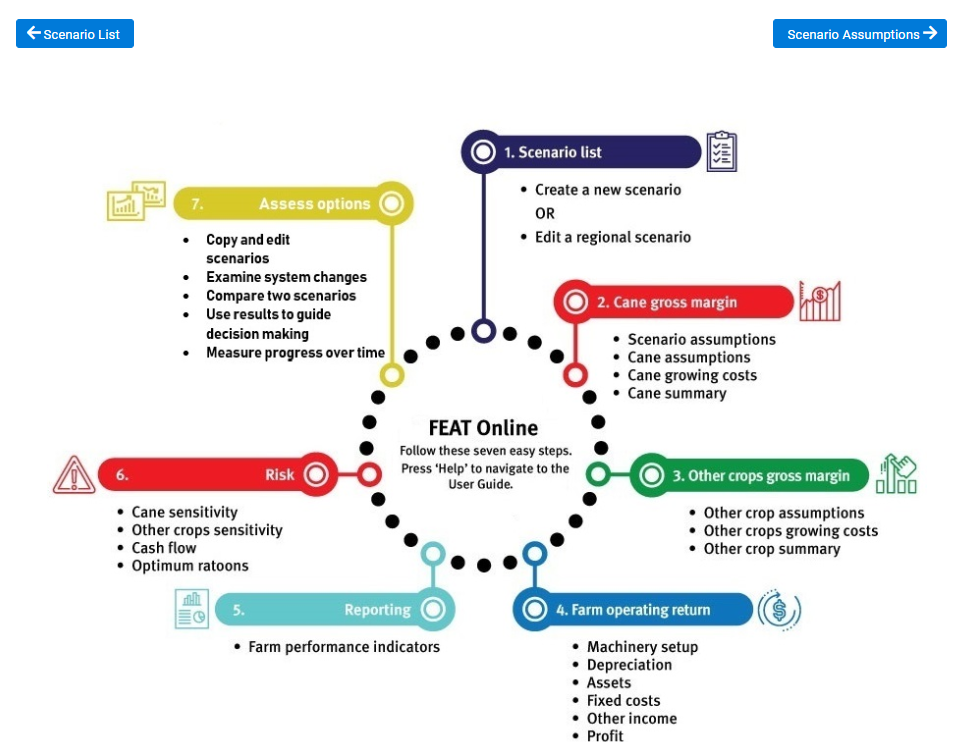
This page shows a flow diagram illustrating the process involved when developing a FEAT scenario.
- FEAT Online is designed so that you can follow all the seven steps to enter your entire farm enterprise or just use some steps in isolation to help with more specific farm decision making.
- Users can select the next button with the right arrow to start or alternatively select a heading on the left hand side.
- It is recommended that first time users follow the next buttons by pressing the arrows on the bottom of the page (the ‘user wizard’).
- Alternatively you can navigate through the different pages using the links on the left hand side bar.
Enter all prices exclusive of GST
