Difference between revisions of "Cash Flow"
| (7 intermediate revisions by the same user not shown) | |||
| Line 1: | Line 1: | ||
This page enables you to download a Cash Flow Worksheet. When downloaded, the worksheet is pre-filled with specific information from the FEAT scenario such as revenues and expenses. The blue cells are pre-filled with information from the FEAT Online scenario you generated the worksheet from. The light grey cells are ones that you can enter data such as Delivery Advances of Sugar ($/t). | This page enables you to download a Cash Flow Worksheet. When downloaded, the worksheet is pre-filled with specific information from the FEAT scenario such as revenues and expenses. The blue cells are pre-filled with information from the FEAT Online scenario you generated the worksheet from. The light grey cells are ones that you can enter data such as "Delivery Advances of Sugar ($/t)". | ||
===How to access Cash Flow=== | ===How to access Cash Flow=== | ||
To download the Worksheet, you need to click on the | To download the Worksheet, you need to click on the "Download Worksheet" button and save the file to a familiar folder on your computer. | ||
[[File:Download Worksheet.png|1000px|frameless|center|link=]] | [[File:Download Worksheet.png|1000px|frameless|center|link=]] | ||
| Line 10: | Line 11: | ||
===Farm Income=== | ===Farm Income=== | ||
1. Enter the Delivery Advances of sugar ($/t) for the corresponding month. | '''1. Enter the "Delivery Advances of sugar ($/t)" for the corresponding month.''' For example, $285 in July, $0 in August and September, $10 in October, etc. | ||
* '''Note:''' this total must equal the Sugar Price ($/t). | |||
* In the below example the delivery advances are spread out over the full year. | |||
3. Allocate percentages of | |||
'''2. Enter the percent of cane crop delivered (and paid) in each month over the harvest season.''' | |||
'''3. Allocate percentages of "Other Crops" and "Other Income" (if applicable) to the corresponding months over the financial year.''' For example, if 100% of "Other Crop" income is received in March then enter 100 in March and leave zero in the other months. This will allocate all of the "Other Crop" income to March. | |||
* In the below example the the "Other Crop" income is spread out over the full year. | |||
| Line 22: | Line 28: | ||
===Variable Costs and Fixed Costs=== | ===Variable Costs and Fixed Costs=== | ||
Allocate percentages of | '''Allocate percentages of "Variable Costs" and "Fixed Costs" to the corresponding months over the financial year.''' | ||
* For example, if approximately 25% of fertiliser costs are paid in August, September, October and November then enter 25 into each of these months and leave the other months zero. | |||
* Another example is if the costs were evenly distributed over the year you would put 1/12% for each month as per the below screenshot. | |||
* Soil test and laser levelling costs can also be included as a variable cost in the fertiliser and land preparation sections in [[Cane Growing Costs]] respectively. | |||
* '''Note:''' depreciation is not included in cashflow, and cane planting material costs are not downloaded automatically as it assumes growers will be using their own planting material. This explains why the end of year cashflow figure may be different to the FEAT Online profit figure. | |||
| Line 33: | Line 39: | ||
===Investment, Finance, Outgoing and Incoming=== | ===Investment, Finance, Outgoing and Incoming=== | ||
'''1. Enter total Investment "Sales" and "Purchases" into the total column (B) and allocate percentages of "Sales" and "Purchases" to the corresponding months over the financial year.''' | |||
'''2. Enter money coming into the business, via "New Borrowings", "Contribution from Owners" and "Interest Earned" (under Finance heading), in each month over the financial year.''' | |||
'''3. Enter money going out of the business, via "Loan Repayments" and "Drawings" (under Finance heading), in each month over the financial year.''' | |||
'''4. The next section will show all outgoing (expenses) and incoming (income) for the corresponding month over the financial year.''' | |||
'''5. Add in last year’s final balance if applicable.''' | |||
| Line 43: | Line 58: | ||
===Total Cash Flow, Year 2, Year 3, and Total Summary=== | ===Total Cash Flow, Year 2, Year 3, and Total Summary=== | ||
'''1. Navigate to the sheets "Cash Flow (Yr 2)" and "Cash Flow (Yr 3)" if you wish to fill out those years.''' | |||
'''2. Navigate to "Cash Flow Summary" to see a summary for each year.''' | |||
Latest revision as of 23:59, 28 June 2023
This page enables you to download a Cash Flow Worksheet. When downloaded, the worksheet is pre-filled with specific information from the FEAT scenario such as revenues and expenses. The blue cells are pre-filled with information from the FEAT Online scenario you generated the worksheet from. The light grey cells are ones that you can enter data such as "Delivery Advances of Sugar ($/t)".
How to access Cash Flow
To download the Worksheet, you need to click on the "Download Worksheet" button and save the file to a familiar folder on your computer.

To complete the Cash Flow Worksheet, you need to open the file and follow the below instructions:
Farm Income
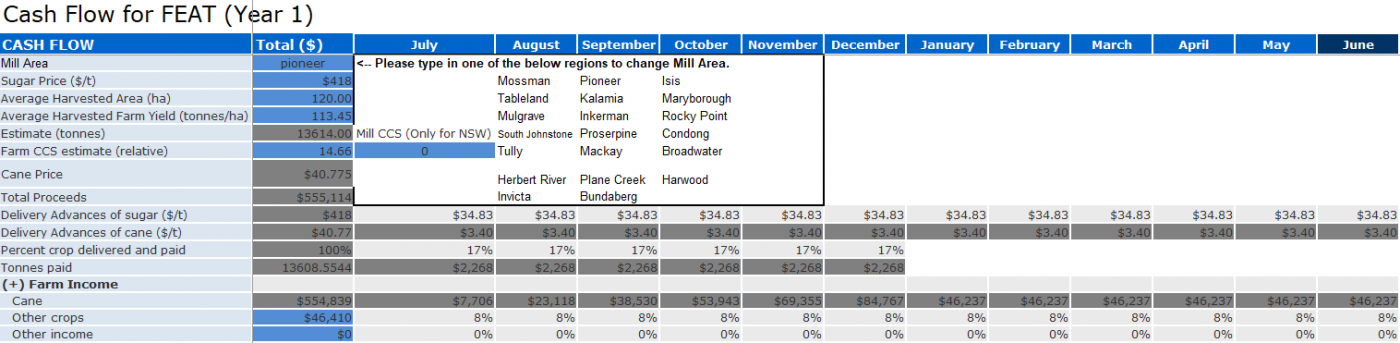
1. Enter the "Delivery Advances of sugar ($/t)" for the corresponding month. For example, $285 in July, $0 in August and September, $10 in October, etc.
- Note: this total must equal the Sugar Price ($/t).
- In the below example the delivery advances are spread out over the full year.
2. Enter the percent of cane crop delivered (and paid) in each month over the harvest season.
3. Allocate percentages of "Other Crops" and "Other Income" (if applicable) to the corresponding months over the financial year. For example, if 100% of "Other Crop" income is received in March then enter 100 in March and leave zero in the other months. This will allocate all of the "Other Crop" income to March.
- In the below example the the "Other Crop" income is spread out over the full year.
Variable Costs and Fixed Costs
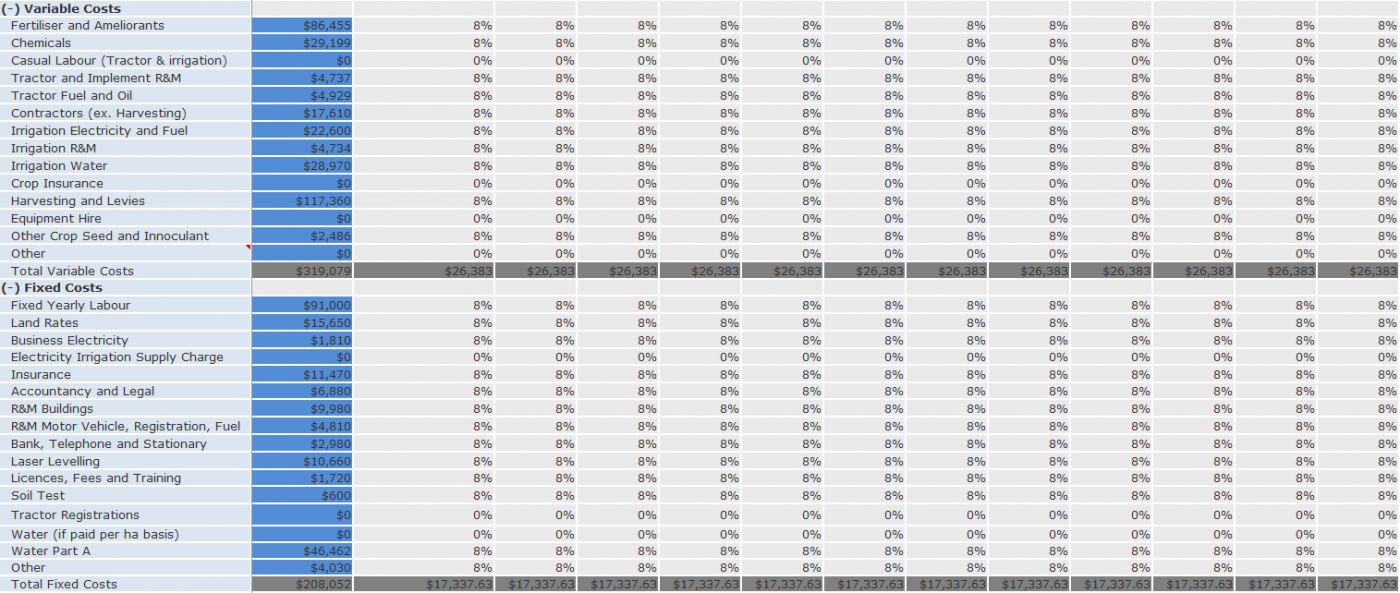
Allocate percentages of "Variable Costs" and "Fixed Costs" to the corresponding months over the financial year.
- For example, if approximately 25% of fertiliser costs are paid in August, September, October and November then enter 25 into each of these months and leave the other months zero.
- Another example is if the costs were evenly distributed over the year you would put 1/12% for each month as per the below screenshot.
- Soil test and laser levelling costs can also be included as a variable cost in the fertiliser and land preparation sections in Cane Growing Costs respectively.
- Note: depreciation is not included in cashflow, and cane planting material costs are not downloaded automatically as it assumes growers will be using their own planting material. This explains why the end of year cashflow figure may be different to the FEAT Online profit figure.
Investment, Finance, Outgoing and Incoming
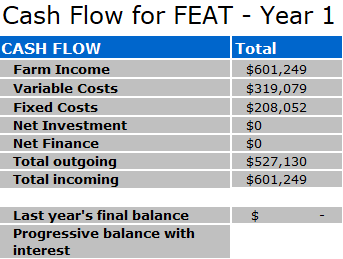
1. Enter total Investment "Sales" and "Purchases" into the total column (B) and allocate percentages of "Sales" and "Purchases" to the corresponding months over the financial year.
2. Enter money coming into the business, via "New Borrowings", "Contribution from Owners" and "Interest Earned" (under Finance heading), in each month over the financial year.
3. Enter money going out of the business, via "Loan Repayments" and "Drawings" (under Finance heading), in each month over the financial year.
4. The next section will show all outgoing (expenses) and incoming (income) for the corresponding month over the financial year.
5. Add in last year’s final balance if applicable.

Total Cash Flow, Year 2, Year 3, and Total Summary
1. Navigate to the sheets "Cash Flow (Yr 2)" and "Cash Flow (Yr 3)" if you wish to fill out those years.
2. Navigate to "Cash Flow Summary" to see a summary for each year.
Cane Sensitivity ⇐ OR Other Crop Sensitivity ⇐|⇒ Optimum Ratoons