Difference between revisions of "User Account/Profile Settings"
Jump to navigation
Jump to search
| (12 intermediate revisions by the same user not shown) | |||
| Line 1: | Line 1: | ||
This page can be found by clicking on | This page can be found by clicking on "My Account" next to the logout button. | ||
===User Account=== | |||
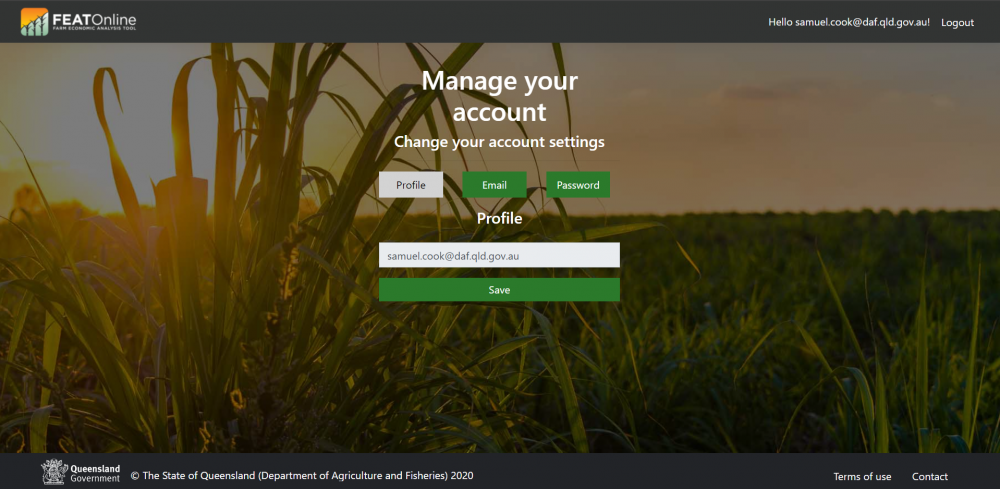
'''Once in "Profile Settings", click "Account" to get to User Account.''' | |||
* This is where users can also update their security and password settings. | |||
[[File:User Account.png|1000px|frameless|left]] | |||
[[File:User Account.png|1000px|frameless|center|link=]] | |||
===Profile Settings=== | |||
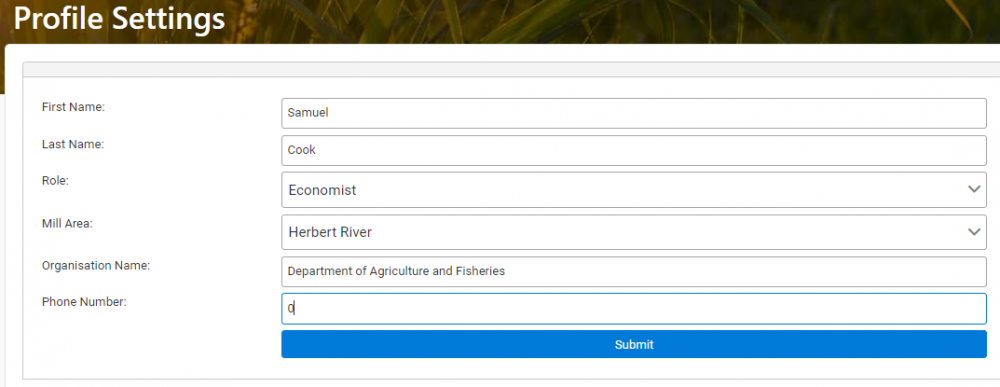
'''Click the far top left "FEAT Online" button to go back into the tool and then select "My Account" to get back to Profile Settings.''' | |||
* This is where users can enter or update their First Name, Last Name, Organisation Name and Phone Number in the respective boxes and choose Role and Mill Area from the drop-down menus. | |||
[[File:Profile Settings.png|1000px|frameless|center|link=]] | |||
[[Home Page]] ⇐|⇒ [[Common Menu Items]] | |||
Latest revision as of 03:09, 28 June 2023
This page can be found by clicking on "My Account" next to the logout button.
User Account
Once in "Profile Settings", click "Account" to get to User Account.
- This is where users can also update their security and password settings.
Profile Settings
Click the far top left "FEAT Online" button to go back into the tool and then select "My Account" to get back to Profile Settings.
- This is where users can enter or update their First Name, Last Name, Organisation Name and Phone Number in the respective boxes and choose Role and Mill Area from the drop-down menus.